
DailyBrief — Staff Daily Digest for Perfex CRM
DailyBrief — Staff Daily Digest for Perfex CRM Original price was: ₹2,368.00.Current price is: ₹379.00.
Back to products
AI Reports Module for Perfex CRM
AI Reports Module for Perfex CRM Original price was: ₹3,694.00.Current price is: ₹568.00.

Work Orders for Perfex CRM

300+ Downloads
Popular this month
Daily Updates
Latest versions available
100% GPL Files
Safe & verified downloads

Original price was: ₹2,368.00.Current price is: ₹379.00.

⭐ MOST POPULAR

Unlimited Downloads

Get instant access to all premium WordPress themes, plugins & template kits.

₹999 / Month
  • ✓ 5,000+ Products
  • ✓ Unlimited Websites
  • ✓ Priority Support
Join Membership

Description

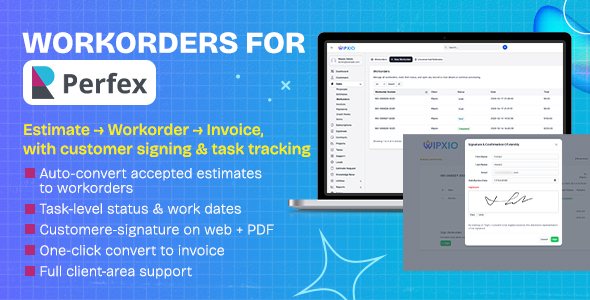
The Workorders Module is a powerful extension for Perfex CRM that bridges the gap between estimates and invoices. It gives your team a complete job-tracking workflow — from the moment a client accepts an estimate, through task execution and customer sign-off, all the way to a finished invoice — without ever leaving Perfex CRM.No core file modifications. Works entirely through Perfex hooks and filters. Safe across Perfex updates.
Automatic Estimate → Workorder Conversion
When a client accepts an estimate, it automatically converts to a workorder — no manual steps required
Any invoice created by the core acceptance flow is cleanly removed and replaced by the workorder
Staff are notified instantly via Perfex notifications
Manual conversion also available — accepted estimates table shows a Convert to Workorder link
Estimate N/A option lets you create workorders for jobs that never had an estimate
✅ Task Management
Every line item on a workorder is a trackable task with its own status
Task statuses: Pending → Approved to Start → In Progress → Completed → Cancelled
Assign a work date to each task — shown on the workorder PDF
Technicians can add tasks in the field (field-added tasks tracked separately)
Cancel individual tasks with a cancel reason, tracked by staff and timestamp
Task-level customer initials option — client must initial each item before signing
✍️ Customer E-Signature & Approval
Public signing page accessible via a unique secure hash URL — no client login required
Full-screen signature pad (touch-friendly, works on mobile and tablet)
Customer confirms identity with first name, last name, and email before signing
Signed date, IP address, and signature image stored with the workorder
Signed workorders are locked from further editing to protect integrity
Satisfaction date recorded on completion
PDF Generation
Professional workorder PDF with your company branding
Includes work dates per task (unique column not found in standard Perfex PDFs)
Signature block on the PDF when workorder is signed
Links to related estimate and invoice shown in the preview and PDF
Billing and shipping address blocks on the PDF
One-Click Convert to Invoice
When a workorder reaches Completed status, staff can convert it to a Perfex invoice in one click
All line items, totals, taxes, discounts, and customer details are carried over
The resulting invoice is linked back to the workorder for traceability
Controlled by a dedicated convert_to_invoice staff permission
Client Area Integration
Workorders appear in the client portal navigation (after Estimates, position 26)
Clients can only see workorders in Sent status or higher — drafts stay private
Clients can view workorder details, task list, and totals
Public signing page is accessible without login via unique hash URL
Client-level contact permission controls which contacts can see workorders
Customer Profile Tab
A Workorders tab is added to every customer profile in the admin area
Shows all workorders for that customer with status badges
Tab displays a count badge when workorders exist
Respects view and view_own staff permissions
Granular Staff Permissions
view — View all workorders
view_own — View only workorders the staff member created
create — Create new workorders
edit — Edit existing workorders
delete — Delete workorders
convert — Convert accepted estimates to workorders
assign_technician — Assign a staff member as the technician
update_task_status — Update individual task statuses
add_cancel_tasks — Add new tasks or cancel existing tasks
convert_to_invoice — Convert completed workorders to invoices
Email & Activity Notifications
Staff who created the estimate (and the sale agent) are notified when a workorder is created from their estimate
Estimate activity log records the conversion with a direct link to the new workorder
Workorder activity log tracks every status change, task update, and signing event
Email template for sending the workorder to the customer
Workorder Numbering & Settings
Configurable prefix (default: WO-)
Configurable starting number
Multiple number formats (plain, year-prefixed, etc.)
Auto-convert on estimate accept can be toggled on/off from settings
Billing notification toggle

Customer Reviews

Reviews

There are no reviews yet.

Be the first to review “Work Orders for Perfex CRM”

Your email address will not be published. Required fields are marked *