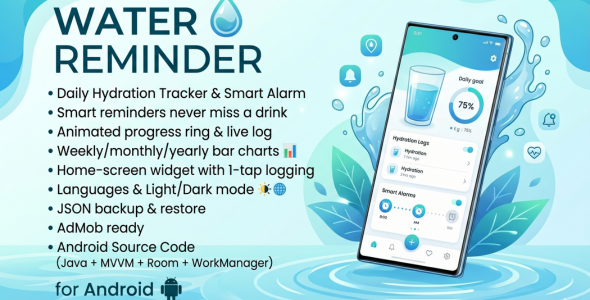
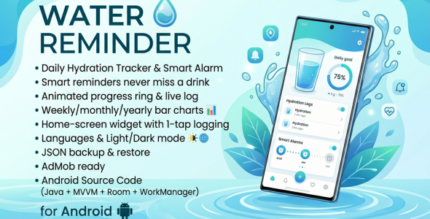
Water Reminder is a full-featured, beautifully designed Android application that helps users stay properly hydrated throughout the day. The app combines a smart, science-backed goal recommendation engine with flexible reminder scheduling, animated circular progress, a home-screen widget, and a rich statistics screen — all packaged in clean, maintainable Java code following Google’s recommended MVVM architecture.Upon first launch, users are guided through a smooth onboarding flow that collects their name, gender, age, weight, height, activity level, and local weather conditions. The app then calculates a personalised daily water intake goal in real time using an evidence-based formula and lets the user fine-tune it with a slider before saving.The main dashboard presents a large animated circular progress ring showing how much of the daily goal has been reached, a horizontal scrollable container picker (glass, cup, bottle, mug, flask, custom), a live log of every drink recorded today with swipe-to-delete, a streak card showing consecutive days of goal completion, and a motivational message that updates dynamically throughout the day.The Reminders screen lets users both manually create individual alarms (with custom label, time, and amount) and auto-generate a full schedule derived from their saved wake-up time, bedtime, and preferred interval — a powerful one-tap setup that eliminates tedious manual entry. All alarms survive device reboots via a BootReceiver and are delivered as high-priority notifications with inline Drink Now and Skip action buttons that log or dismiss the entry without opening the app.The History screen shows interactive bar charts (via MPAndroidChart) for weekly, monthly, and yearly periods, with goal-achieved bars highlighted in a distinct colour and summary statistics (average, maximum, minimum, and total intake) shown below the chart.A home-screen widget shows the current intake, goal, percentage progress bar, and a one-tap Drink button — all updated in real time from the Room database without opening the app.Data safety is covered by a JSON-based backup and restore system that exports all records to the device’s external storage with a timestamped filename, and imports them back with a single file picker. An optional automated backup can be scheduled via WorkManager. The app also sends an end-of-day summary notification and a goal-achieved celebration notification with confetti vibration pattern.The codebase is clean, fully commented, and ready for immediate branding — just replace the package name, launcher icons, AdMob IDs, and colour palette in a few minutes.
Home Dashboard
Animated circular progress ring with smooth value interpolation (800 ms animator)
Real-time intake display in ml or fl oz depending on user preference
Motivational message that dynamically reflects current hydration status
Drink count badge and today’s intake log (RecyclerView with DiffUtil)
Horizontal container picker — Glass, Cup, Bottle, Mug, Flask, and Custom
FAB (Floating Action Button) to instantly log the selected container volume
Custom-amount dialog accepting any value from 1–2000 ml
Undo last drink via Snackbar action or dedicated button
Streak counter displaying consecutive days with completed goals
Pull-to-refresh for streak recalculation
Quick navigation to Settings and History
⏰ Smart Reminders
Create unlimited individual reminders with custom time, label, and drink amount
Auto-generate a full reminder schedule from wake time, bedtime, and interval
Enable/disable each reminder individually via toggle switch
High-priority notifications with Drink Now and Skip inline action buttons
Logging a drink directly from the notification updates app data in the background
Exact alarm scheduling (AlarmManager.setExactAndAllowWhileIdle) for reliable delivery
Alarms rescheduled automatically after device reboot via BootReceiver
Alarms rescheduled automatically after app update via MY_PACKAGE_REPLACED
Foreground service for reliable reminder delivery on strict battery-saver devices
Separate clear buttons for auto-generated and manually created reminders
Custom notification sound — pick any audio file from the device or reset to default
Three dedicated notification channels: Reminders, Goal Achieved, Daily Summary
History & Statistics
Interactive bar chart (MPAndroidChart) with animated entry
Weekly, Monthly, and Yearly tabs for flexible time-range switching
Goal-achieved bars highlighted in a distinct accent colour
Summary cards: Average, Maximum, Minimum, and Total intake for the selected period
All values honour the user’s ml / fl oz unit preference
User Profile & Goal Engine
Collects name, gender, age, weight, height, activity level, and weather condition
Real-time personalised goal calculation using a science-based formula (weight × 35 ml base, adjusted for activity, gender, weather, and age)
Goal slider (500–5000 ml, step 50 ml) with live label and recommended value display
Configurable wake-up time, bedtime, and reminder interval
Optional profile photo from device gallery
ml / fl oz unit toggle with automatic conversion throughout the entire app
Profile data persisted in Room database as a singleton row
Home-Screen Widget
Shows current intake, daily goal, percentage progress bar, and percentage text
One-tap Drink button logs the configurable widget drink amount directly
Widget drink amount configurable via a slider in Settings (e.g., 150–500 ml)
Tapping the widget body opens the main app
Updates itself after every logged drink
⚙️ Settings
Light / Dark / System theme selection (applied instantly, no restart required)
In-app language switcher (English, German, Spanish, French, Hindi) — full app restart for instant locale change
Custom notification sound picker with reset-to-default option
Manual JSON backup with timestamped filename saved to external storage
One-tap JSON restore from any file picker-accessible location
Automatic backup toggle (WorkManager periodic task)
Widget default drink amount slider
Edit profile shortcut
Clear all water intake data with confirmation dialog
Last backup timestamp displayed









Reviews
There are no reviews yet.